
Table of Contents
- Why Smart Gadgets Matter for Busy Working Parents
- 1. 3-in-1 Foldable Wireless Charging Dock - Consolidate Your Desk
- 2. MagSafe Car Phone Holder - Stay Connected on the Commute
- 3. Car Window Cup Holder & Phone Storage - Organise Your Vehicle
- 4. Car Headrest Fan - Keep Kids Comfortable on Long Drives
- Best Tech Gadgets for Parents: Quick Comparison
- Time-Saving Gadgets for Busy Parents: How to Choose
- Smart Home Devices for Families: Beyond the Essentials
- Frequently Asked Questions
Last Updated: October 18, 2026
Why Smart Gadgets Matter for Busy Working Parents
Juggling work deadlines, school pickups, and household responsibilities leaves little room for complexity.
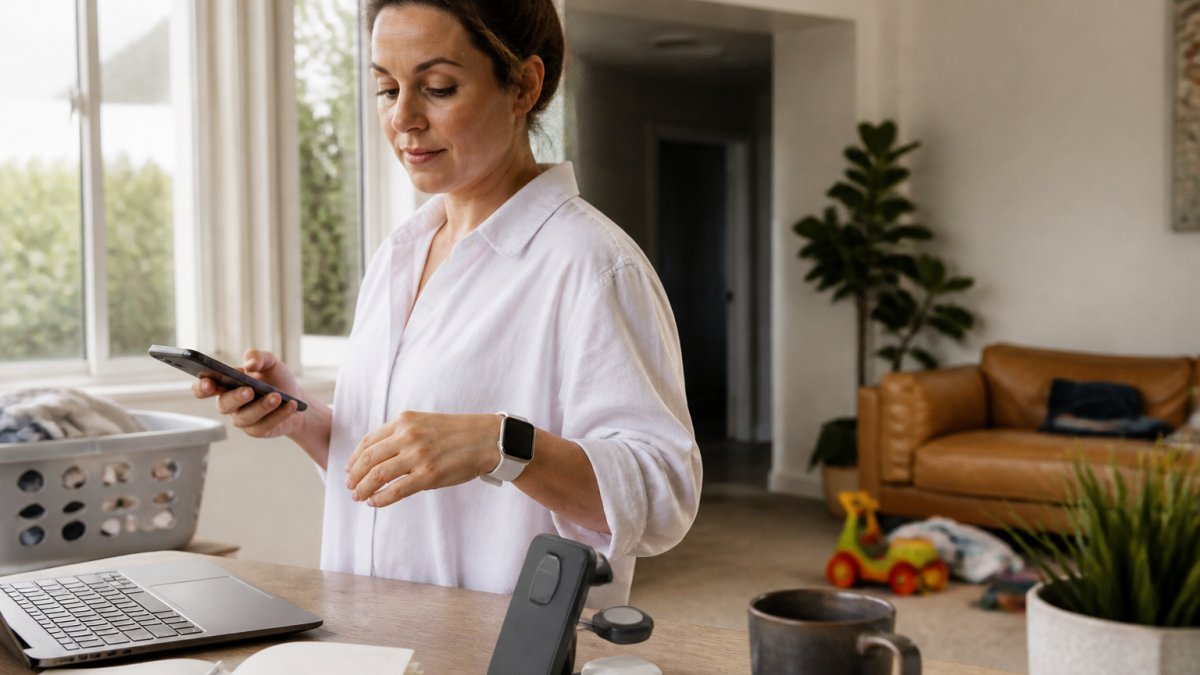
The best smart gadgets solve specific problems in your daily routine, charging devices without clutter, staying connected safely on your commute, or keeping kids comfortable on long drives.
Below, we'll show you how to choose smart gadgets that fit your life, not add to it, each selected for practical value, ease of setup, and genuine time savings.
1. 3-in-1 Foldable Wireless Charging Dock - Consolidate Your Desk
Stop hunting for three different chargers every morning. A foldable wireless charging dock for your phone, smartwatch, and earbuds case keeps everything in one compact spot, the single most effective desk organiser for tech-heavy professionals.

The 3-in-1 Foldable Wireless Charging Dock from Oddities & Ends costs $79.95 and folds flat to roughly 80 × 71 × 39 mm when stored.
2. MagSafe Car Phone Holder - Stay Connected on the Commute
Your commute is sacred time, whether driving to the office, picking up kids, or heading to meetings. A reliable car phone holder keeps your device visible and accessible without distraction, giving hands-free access to navigation, calls, and audio.

The MagSafe Car Phone Holder from Oddities & Ends costs $38.95 and uses magnetic attachment with a foldable arm. It mounts via suction cup to smooth, flat surfaces like your windscreen or dashboard.
For working parents managing back-to-back appointments, your phone stays in view without blocking your line of sight, so you can switch between GPS, calls, and voice messages without taking your eyes off the road.
3. Car Window Cup Holder & Phone Storage - Organise Your Vehicle
Your car becomes a mobile office and transport hub when you're managing work and family. A car window organiser combining a cup holder, phone pocket, and small storage section keeps your vehicle tidy, this is where smart gadgets for busy working parents show their real value.

The Car Window Cup Holder & Phone Storage Organiser from Oddities & Ends is priced at $45.95 and clips onto your car window with a bracket mount.
What makes this practical: your phone stays accessible, your coffee doesn't spill on the centre console, and small items, sunglasses, receipts, kids' snacks, have a designated spot, reducing the mental load of keeping your vehicle functional.
4. Car Headrest Fan - Keep Kids Comfortable on Long Drives
Long car journeys with kids test everyone's patience. A rechargeable car headrest fan with adjustable speed makes back-seat passengers more comfortable, which translates directly to a calmer drive for the parent behind the wheel.
The Car Headrest Fan from Oddities & Ends costs $49.95 and attaches to any suitable car headrest using a hook-and-loop strap.
For working parents on family road trips or frequent school runs, this fan eliminates one major complaint: "It's too hot back here." Kids stay comfortable, meaning fewer interruptions and less stress.
Position the fan away from the driver's view and passenger restraints, and top it up via USB at home or in the office between trips.
Best Tech Gadgets for Parents: Quick Comparison
| Gadget | Price | Best For | Key Benefit |
|---|---|---|---|
| 3-in-1 Wireless Charging Dock | $79.95 | Desk organisation | Charges three devices simultaneously |
| MagSafe Car Phone Holder | $38.95 | Safe commuting | Secure, adjustable mounting for navigation |
| Car Window Organiser | $45.95 | Vehicle organisation | Consolidates phone, drinks, and small items |
| Car Headrest Fan | $49.95 | Passenger comfort | Three-speed cooling for back seats |
Time-Saving Gadgets for Busy Parents: How to Choose
Most buying guides tell you to 'choose gadgets that solve real problems', true but useless at 8pm with a toddler on your hip. Here is the decision framework we use to assess whether a gadget earns a place in a working-parent routine.
1. Map the gadget to a specific routine, not a category
Working-parent time is not one block; it is a sequence of high-friction windows. Before buying anything, name the window it will serve:
- Morning launch (6:30-8:30am): charging, school-bag packing, breakfast, commute prep.
- Commute and school run: navigation, hands-free calls, back-seat comfort, in-car storage.
- Workday (office or home): desk charging, focus, calendar coordination.
A gadget that does not clearly shorten or de-stress one of those windows is a hobby purchase, not a parenting tool. The 3-in-1 charging dock earns its place in the morning launch window; the headrest fan earns its place on long school runs.
3-in-1 Foldable Wireless Charging Dock – White →
2. Calculate total cost of ownership, not sticker price
A $79.95 dock is not a $79.95 decision. Add the power adapter you must supply (typically $20-$40 for USB-C PD), any magnetic rings or cases for compatibility, and replacement costs if a cable fails. A $38.95 car mount is not $38.95 if the suction cup fails in summer heat and you replace it yearly.
Ask three questions before checkout:
- What is in the box, and what is not? The dock includes a USB-C cable but not the adapter. The headrest fan includes a USB cable. The car organiser includes the bracket. Know what you still need to buy.
- What consumables or subscriptions does it require? None of the four gadgets here require a subscription, a genuine advantage over smart cameras, video doorbells and some trackers that lock features behind monthly plans. If a gadget needs an app account, check whether core features work without it.
- What is the warranty and return path? Confirm the warranty period and whether returns are accepted for change-of-mind before you rely on a gadget in a daily routine.
3. Check compatibility before you commit
Compatibility failures are the most common reason a smart gadget gets abandoned. Before ordering:
- Wireless charging: confirm your phone, watch and earbuds case all support the Qi standard the dock uses. If your watch uses a proprietary charger, the dock's watch pad may not charge it.
- MagSafe mounting: confirm your phone is MagSafe-compatible or that the included magnetic ring fits your case. Thick or non-magnetic cases can weaken the hold.
- Vehicle fit: check that the suction mount has a smooth, flat surface on your windscreen or dashboard, and that the window organiser's clip fits your window trim and does not foul the door seal or airbag zone.
4. Weigh setup effort against daily payoff
A gadget you install in two minutes and use daily beats one that takes an afternoon to configure and needs fortnightly app updates. Prefer devices that work out of the box without a hub or account. USB-rechargeable devices avoid battery hunting; suction and clip mounts avoid drilling; foldable designs pack away.
5. Apply an age-stage and budget lens
The right gadget depends on your family stage:
- Baby and toddler stage: prioritise back-seat comfort (headrest fan), in-car storage (window organiser) and safe phone access (car mount). Budget roughly $40-$50 per item.
- Primary-school stage: add desk charging consolidation and a family calendar routine. Budget roughly $40-$80 per item.
- Teen stage: shift spend toward charging capacity, tracking and connectivity, and revisit privacy settings on any connected device.
A sensible starting budget is $100-$150 for one desk gadget and one car gadget, addressing the two highest-friction windows for most working parents. Add smart-home devices only after those basics work.
Smart Home Devices for Families: Beyond the Essentials
Once your desk and car routines are sorted, the next layer of time savings comes from the home itself. But smart-home devices for families carry trade-offs listicles rarely mention: subscriptions, privacy, compatibility, and the risk of adding complexity rather than removing it.
Family calendars and shared displays
A shared digital calendar reduces the 'who is picking up whom' mental load more than almost any other purchase. Ask: does it sync with your existing calendar accounts, can family members add events without a phone, and does it work if the internet drops? A display requiring a subscription for basic sync is rarely worth it; one that works offline is more resilient.
Smart locks and keyless entry
Keyless entry genuinely helps when you are carrying a toddler, groceries and a work bag. But check three things: whether the lock works with your existing door hardware (many need a specific deadbolt), whether it still opens with a physical key if the battery dies, and whether the app requires a cloud account. For renters, reversible no-drill options are worth the premium.
Wi-Fi routers and parental controls
A router with built-in parental controls can replace a separate subscription service, but the controls vary widely. Look for per-device scheduling, age-adjustable content filtering, and the ability to pause one device without cutting the whole house. Check whether parental controls require a monthly subscription, some routers bundle a free tier and charge for advanced filtering.
Security cameras and video doorbells
These are the highest-risk category for families. Before buying, confirm: where footage is stored (local versus cloud), whether a subscription is required to view recordings, whether two-factor authentication is available, and whether the device has a physical privacy shutter. A camera that records audio in a child's room or shared living space deserves a family conversation, not just a product review.
Trackers and item finders
Trackers are useful for keys, bags and school gear, but check the network they rely on, the battery type and replacement cost, and whether they can be used to track a person without consent. A tracker in a school bag is a reasonable use; a tracker on a person raises consent and safety questions worth discussing openly.
The subscription trap
Many smart-home devices are cheap to buy and expensive to own. A camera may require a $5-$15 monthly plan to view recordings; a doorbell may charge for history; a router may charge for advanced parental controls. Add 12 months of subscription to the sticker price and compare against a device with local storage or no subscription, for a family on a budget, no ongoing cost is often the better long-term buy even at a higher upfront price.
Compatibility and setup
Check which ecosystems the device supports, Apple Home, Google Home, Amazon Alexa or a manufacturer's own app, and whether it works without a hub. Prefer devices that set up in under 15 minutes and keep working if the cloud has an outage. If a device requires a specific phone platform, confirm every adult in the household has it before buying.
Accessibility
For families with a member who has low vision, hearing loss or limited dexterity, look for physical buttons, large text in the app, voice control that works without a subscription, and haptic or visual alerts alongside audio. These features are rarely marketed but make the difference between a device that is used and one that is abandoned.
Frequently Asked Questions
What are some good smart gadgets for parents?
Smart gadgets that work best for parents focus on reducing friction in daily routines. Wireless charging docks consolidate multiple devices in one spot, car phone holders keep your hands free during commutes, and organisers maximise vehicle space for families on the move. Choose gadgets that solve a specific problem in your routine rather than adding complexity. Compatibility with your existing devices matters, check before purchasing.
Which time-saving gadgets for busy parents actually deliver results?
Time-saving gadgets for busy parents work when they eliminate repetitive setup tasks or reduce decision-making. A wireless charging dock removes the need to hunt for cables each morning. Car organisers keep essentials within reach, cutting search time during drives. The best choices integrate seamlessly into your existing routine without requiring new habits or apps. Focus on gadgets that solve problems you face daily, not aspirational ones.
Are smart home devices for families worth the investment?
Smart home devices for families offer genuine value when they address real bottlenecks in your household. A car headrest fan keeps children comfortable on long trips, reducing complaints and distractions. A phone holder with magnetic mounting prevents accidents and distracted driving. The key is matching the device to your actual lifestyle, a gadget that sits unused delivers no value. Start with one or two devices that solve immediate problems, then expand if needed.
What makes a good tech gift for busy parents?
A good tech gift for busy parents solves a real problem without creating new ones. It should work with devices they already own, require minimal setup, and deliver immediate benefit. Wireless charging docks, car organisers, and hands-free camera grips all fit this profile because they simplify existing routines. Avoid gadgets that require subscriptions, frequent charging, or new apps unless they save significant time. Practical beats trendy every time.